

Introduction
The upcoming WordPress 7.0 release introduces major improvements focused on collaboration, AI integration, performance, modern design tools, and developer experience. This version is designed to make website building faster, smarter, and more efficient for developers, bloggers, businesses, and content creators.
Top Features in WordPress 7.0
1. Real-Time Collaboration
WordPress 7.0 introduces real-time collaborative editing similar to Google Docs. Multiple users can now work on the same post or page simultaneously while tracking live changes and active editors.
Benefits:
- Faster content creation
- Better team collaboration
- Reduced editing conflicts
- Improved workflow for agencies and editorial teams
2. Modern Admin Dashboard Redesign
The admin dashboard receives a cleaner and more modern interface with improved navigation, better accessibility, and a refreshed color scheme.
Improvements:
- Smoother navigation
- Better user experience
- Faster access to tools
- Improved responsiveness
3. AI Integration (AI Client API)
One of the biggest highlights is native AI integration support. WordPress 7.0 allows plugins and themes to connect with AI providers such as:
- OpenAI
- Anthropic
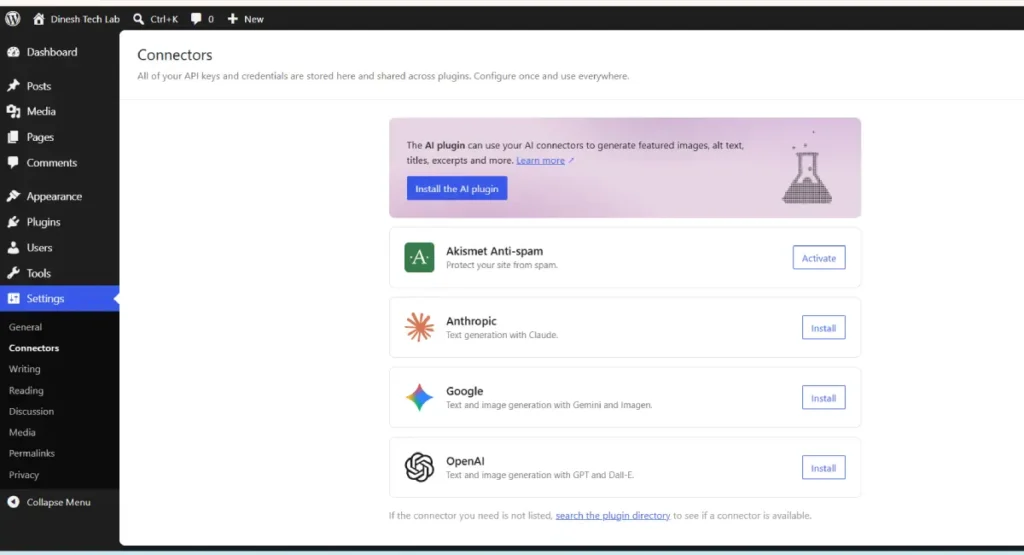
AI Capabilities:
- Generate blog content
- Improve writing
- Create summaries
- Generate content ideas
- AI-powered assistants inside WordPress
This feature can significantly improve productivity for bloggers and marketers.
4. Responsive Block Controls
Users can now control block visibility separately for desktop, tablet, and mobile devices directly inside the editor.
Advantages:
- Better responsive design
- Improved mobile optimization
- Easier content management across devices
5. Visual Revision Comparison
WordPress 7.0 adds visual revision comparison tools allowing users to compare page changes visually instead of only text-based revisions.
Useful For:
- Designers
- Content editors
- Agencies managing client revisions
6. New Blocks & Design Tools
Several new Gutenberg blocks and design enhancements are included:
New Features:
- Breadcrumb block
- Icon block
- Enhanced Grid layouts
- Gallery lightbox support
- Video backgrounds in Cover blocks
These tools provide greater flexibility for modern website design without requiring additional plugins.
7. Enhanced Navigation Block
The Navigation block now supports:
- Better mobile menus
- Responsive overlays
- Easier menu customization
- Improved usability
This helps developers create advanced responsive menus more efficiently.
8. Font Library Improvements
A centralized font management system allows themes and users to manage typography more effectively.
Benefits:
- Upload custom fonts
- Activate/deactivate fonts easily
- Better performance management
- Improved typography consistency
9. PHP-Only Block Registration
Developers can now register Gutenberg blocks entirely using PHP without needing JavaScript build tools.
Developer Benefits:
- Faster block development
- Simpler workflows
- Easier plugin maintenance
- Reduced dependency on complex tooling
This is especially useful for WordPress plugin developers.
10. Major Performance Improvements
WordPress 7.0 focuses heavily on speed and optimization.
Performance Gains:
- Faster page loading
- Optimized database queries
- Reduced JavaScript usage
- Better overall Core Web Vitals
Expected Improvements:
- 35% faster page load
- 28% fewer database queries
- 20% reduced JavaScript load
Final Thoughts
WordPress 7.0 represents a major step forward in modern web publishing and development. With AI-powered tools, collaborative editing, improved performance, and advanced design capabilities, this release aims to provide a more powerful and user-friendly experience for both developers and content creators.